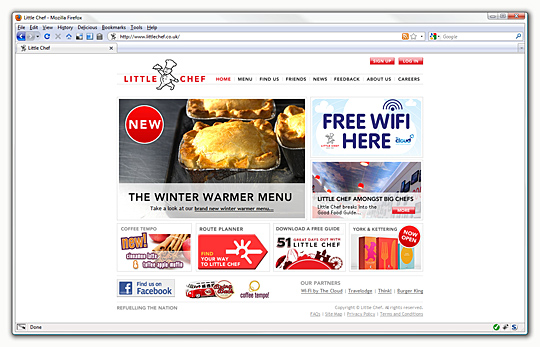
The longest running and most high-profile website I have the pleasure of working on is for Little Chef. With such a recognisable brand and in a period of increased company activity, the site is increasing its role as the primary communication with customers. With a recent aesthetic refresh which only select parts of the site were quick to follow, the remainder was still stoically in the old style - updating the rest was a deceptively large task and exposed the opportunity to rectify some of the niggling obstructions that had grown with the site. What on the surface was just a visual update was in a fact a more far-reaching upgrade.
Styles
With a visual change came the auspicious chance to update all of the archaic stylesheets. Most content-driven sites tend to have a central sheet with common styles used across different pages - these usually consist of header, footer, sidebar and default content styles; the Little Chef site doesn't suit this kind of organisation due in part to the uniquely designed sections, very few styles carry across different pages which meant when I originally created the styles, specificity rules played a big part in crafting different sections. The biggest issue with this is that its near impossible to start with a "blank canvas", most common identifiers (#content, #sidebarRight etc.) carry some default baggage with them. Lesson learned, the default stylesheet now only defines the header and footer with the primary content area left up to section specific stylesheets to define; this is not flawless, especially when dealing with Internet Explorer specific styles. Ordinarily only a single stylesheet for each browser should be needed across the site, however styles which were implicit in section specific sheets would need to be explicit in a site-wide sheet. For instance, if there are two section specific stylesheets, each one can use class identifiers or IDs without fear of clashing, however a site-wide one would need an extra layer of specificity for these elements to be targeted. The only recourse was an identifier on the BODY element for each section which means the browser specific style rules always need to be prefixed (sometimes called "warts") which can be tiresome:
body#friends #sidebarRight { padding-top: 5.8em; }
body#friends #sidebarRight .login button { margin-right: -14px; }

/* news.css */
body#news .newsJump { height: 1%; width: 555px; }

/* feedback.css */
body#feedback .intro { height: 1%; width: 555px; }
body#feedback form legend { margin-left: -0.7em; }
Internet Explorer 6 once again proved the most obtuse of browsers, primarily its idiosyncrasies surrounding the use of ID and class specifiers on a single element e.g. #content.sectionName. Bizarrely the specific element cannot be styled beyond the first instance, however any child elements can. So if a #content rule exists, all #content rules regardless of any subsequent class specific rules will have the same styles, however if there is #content .elementOne and #content.sectionName .elementOne, the rules act as they should. It's an infuriatingly vulgar arrangement but one that is not entirely unworkable - lamentably most of the "fixes" involve positioning elements absolutely so that IE6's fast-and-loose interpretation of the box model is mitigated.
To match the new stylesheets, more or less every single page's markup was re-examined. The history of the site meant what had begun innocuously had mutated with repeated updates and innumerable additions and modifications; many sections were simplified or wholly recreated, the Menu being the largest example of the latter.
Framework
The biggest change by far though is the use of the Zend Framework for the entirety of the site. More than just a gravitation towards the new and shiny, the site ideally would have been built with a framework from the outset had it not been for extenuating factors denoting otherwise. Originally conceived for a PHP4 host, the site originally used individual PHP scripts and an ensemble of different libraries and configurations; as is often the case, this worked but showed its fragility as the site grew - and most crucially - would become a hindrance as it grew further. Indeed, the plans for the Little Chef site are such that were it to remain as-is, the work required in the future would be even greater, especially to maintain any kind of quality.
Controller is put to work with the router handling the forwarding of the old .php files to the relevant controllers - so whereas now a URL may be aboutus/wifi, the old URL wifi.php and its shortened form wifi will also work. RSS is now provided through context switching while user authentication is handled using Auth and the action init() hook. Of course if these were the most complicated aspects of the site the rebuild would have been drastically simpler and more straightforward.
Route finder
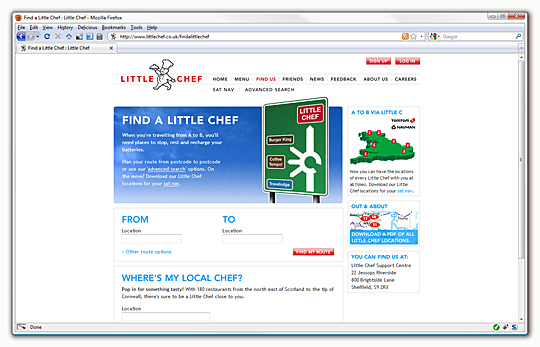
The largest amount of time was spent on the most popular area of the site, the "Find a Little Chef" service which integrates with the Microsoft MapPoint web service. The full details of the implementation are for another time, suffice to say that it was neither quick nor routine to enable PHP to talk to the service in a manageable way. The most trying part of the process was the number of different states that are possible from only exposing two different pieces of functionality: find a route from one location to another with a corridor search for restaurants and a radial search for restaurants around a specific point. Using the former for this example, there is the best case scenario where both locations are successfully found by the service, a route is calculated between them and restaurants and available and displayed appropriately; beyond this state however is a multitude of different cases, all of which require a disproportionate amount of attention. For instance, if one out of two of the locations is ambiguous, a screen should be displayed offering different choices - this is well explored behaviour present on a number of different mapping services. The problem arises however in how to do a subsequent search once a location is chosen.
Using the query "Barnsley" as a concrete example - there are three different "Barnsley"s in the UK. MapPoint helpfully provides a "DisplayName" property for a location which means displaying a list of the different "Barnsley"s available is easy, however the only meaningful information returned by MapPoint that is subsequently useful is the latitude and longitude. The display name can't be used to perform a search as one of the names returned is "Barnsley, England, United Kingdom" which is still ambiguous, an Entity ID is returned however this is not usable as the primary MapPoint data sources do not allow entity ID searches, only user data sources are. To do a route search, established locations must be used rather than just latitude and longitude points which means that once a choice has been made and the latitude and longitude passed back to the service, a new search has to be done to find the closest route-able location which, disappointingly enough, can fail despite the service returning a valid location not one query prior. It's a startlingly backward way of doing things and just one of a catalogue of traumatically debilitating obstacles to implementation compounded by the drought of quality documentation available which means that alternatives and real-world implementations beyond the interminable FourthCoffee examples are non-existent.
Friends
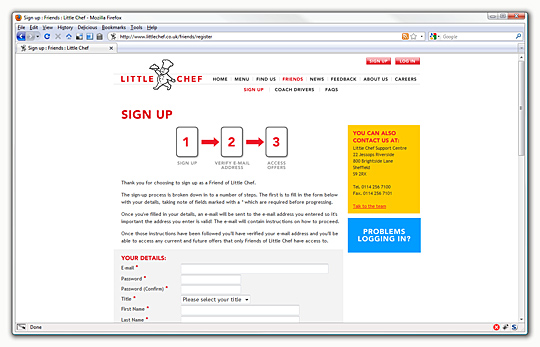
The Friends section, having seen over 36,000 sign ups since its inception, was given an equal amount of attention, most of it devoted to the "Sign up" form. Form takes away a lot of the pain but does have some noticeable gaps. I don't use the automatic output decorators of a form, primarily as past experience has shown that every form is unique in one way or another that automatic generation can't and shouldn't handle. The first of these was a combination field for dates which is reused and extended in the Feedback section with a time implementation - this is only possible if one manages to stumble across the $context parameter to a form field's validation method. Either not available in earlier framework releases or otherwise more cleverly hidden away, $context is an array of all the other data passed to a form which allows for more capable validators and form elements. For a date field, outputting as three drop-down boxes or a JavaScript generated calendar control makes no difference as the validation method can gather any other fields and present back a single, valid date:
class Lib_Form_Element_Date extends Zend_Form_Element_Xhtml {
	public function init() { $this->addValidator(new Lib_Validate_Date()); }

	public function isValid($value, $context = null) {
		if(is_array($value) && array_key_exists("day", $value) &&
			array_key_exists("month", $value) && array_key_exists("year", $value))
		{
			$value = strftime("%F", mktime(0, 0, 0, $value["month"], $value["day"], $value["year"]));
			$this->setValue($value);
		}

		return parent::isValid($value, $context);
	}
}
class Lib_Validate_Date extends Zend_Validate_Abstract {
	const INVALID_DATE = "invalidDate";

	protected $_messageTemplates = array(
		self::INVALID_DATE => "\"%value%\" is not a correct date"
	);

	public function isValid($value, $context = null) {
		$this->_setValue($value);

		if(is_string($value) && (strpos($value, "-") !== false)) {
			list($y, $m, $d) = explode("-", $value);
			if(!checkdate(intval($m), intval($d), intval($y))) {
				$this->_error = self::INVALID_DATE;
				return false;
			}
		} else {
			if(strtotime($value) === false) {
				$this->_error = self::INVALID_DATE;
				return false;
			}
		}

		return true;
	}
}
This is perhaps the simplest use of the parameter but $context opens up other possibilities as well, namely for validators which base their result on the values of other fields. The most common use would be a password and confirmation fields, without $context it's impossible to provide a validator for the rule that both must be identical. This case can be made more generic with a FieldMatch validator which can match any number of fields to each other in the case that such a situation would arise.
A more complex example is one where validators are specifically applied only if the value of another fields is as specified. The easiest way to think about this is the "Other" option for drop downs, if this is selected then a user should fill in the free-text field provided. Again this case can be boiled down to a generic "Contingent" validator which is constructed with a list of fields, a list of trigger matches and a list of validators to apply in the event of a field match. Perhaps easier to demonstrate than to describe:
$form->addElement("select", "title", array(
  "required" => true,
  "multiOptions" => array("Mr" => "Mr", "Mrs" => "Mrs", "Other" => "Other")
));
$form->addElement("text", "titleother", array(
  "allowEmpty" => false,
  "validators" => array(new Lib_Validate_Contingent("title", "Other", new Zend_Validate_NotEmpty()))
));
class Lib_Validate_Contingent extends Zend_Validate_Abstract {
	protected $_fields = array(), $_matches = array(), $_validators = array();

	public function isValid($value, $context = null) {
		foreach($this->_fields AS $k => $field) {
			if((is_array($this->_matches[$k]) && in_array($context[$field], $this->_matches[$k])) ||
				$context[$field] == $this->_matches[$k])
			{
				foreach($this->_validators AS $validator) {
					if(!$validator->isValid($value, $context)) {
						$this->_messageTemplates = $validator->getMessageTemplates();
						$this->_messageVariables = $validator->getMessageVariables();
						$this->_value = $value;

						foreach($validator->getMessages() AS $k => $v) {
							$this->_error($k, $value);
						}

						return false;
					}
				}
			}
		}

		return true;
	}
}
In this way the Contingent validator is like a trigger - it doesn't provide any validation messages itself but feeds back the associated validator's. Important to note the "allowEmpty" setting for the field which means the validator is triggered even if the field itself is empty which in most cases is entirely the point. Originally this validator was attached to the other field (in the example above this would be "title"), however this was logically odd and perplexing in some situations as the validation messages would then be bound to that field rather than the target one. With this it's entirely possible to create complex, cascading forms without forgoing the use of validators and relying on unwieldy control structures.
Conclusion
Both the rebuild itself and the launch, while not without their vexing moments, went better than I had expected and the wealth of lessons learned, components built and challenges encountered more than makes up for the teeth-grinding suffered. There are a myriad of other, smaller complications which don't warrant a full exploration, most of them borne out of the need for better debugging, especially when dealing with external services. The true measure of the work done now will be in the months and hopefully the years to come when the site is sure to mature into something perhaps drastically different from what it is now.